



This is Where I Shall Start it.
By TLighting
· 1584 views
So cause this is the first time i am posting here and in a blog. I thought i could feel you in what i am thinking of doing.
I have been playing Runescape for years.... i remember the X-mas event with the puppets. So i think i am coming close to 10 years >.< Through those years i have been off and on playing. Its ether i get bored or i have something else to play or WORK o.o..... . . . But i have off for two months now so RUNESCAPE TIME > :D
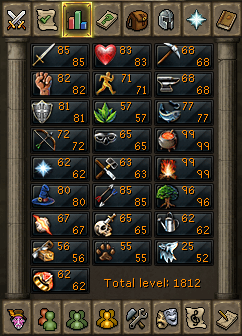
My stats are not crazy good just last month i got my second 99 skill. My two 99's are Cooking and Firemaking.
What i want to post on this blog is just what i do and get on my everyday adventures. So Slayer tasks i will tell you how many i have to kill, what i am taking, where i am going, and what i got for drops. Now why will my blog be different? Just i dont see my self as a pro player so i dont max out things to try to get the best things. So whatever i get will be probably what you can get and you probably be able to do better then what i could.
I used to be in a guild called SkillerzforMillz and it was ok for awhile but it died off. So now i am the only person in the guild and i am not even the leader XP. But i just need another reason to play Runescape again and posting stuff on a Runescape blog might be fun ^.^
So i hope you find this blog enjoyable.
Recommended Comments