



Skip to content
View in the app

A better way to browse. Learn more.

Tip.It Forum

A full-screen app on your home screen with push notifications, badges and more.

To install this app on iOS and iPadOS
  1. Tap the Share icon in Safari
  2. Scroll the menu and tap Add to Home Screen.
  3. Tap Add in the top-right corner.
To install this app on Android
  1. Tap the 3-dot menu (⋮) in the top-right corner of the browser.
  2. Tap Add to Home screen or Install app.
  3. Confirm by tapping Install.

A P2P year in review

(0 reviews)

someonedropthebass_zps297326be.png


Today marks 1 year I've been P2P. WHEEE~


Okay first some recent levels I got.

[hide]

90mining_zps56e9a251.png

85smithing_zpsde42aeaa.png

84fishing_zps315d8b71.png[/hide]


Next let's compare levels from then and now
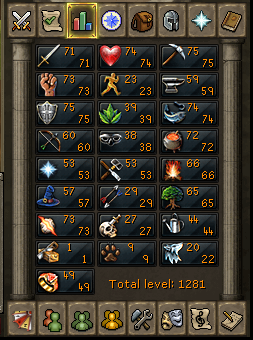
Updatedskills2.pngTotallvlsmay222013_zpsc74098c7.png


Since becoming P2P I've earned 1074 levels.


Tasks_zps94f4b727.png


I've completed 375 task most important being the hard Seers Village, Fremennik, and Morytania task.


[hide]Workit_zpsa9348953.png[/hide]


Quest Cape!


I also probably have a <50m bank but whatever.


I have killed every boss in the game minus Tormented Demons.

I have been part of the EoC Beta from start as well as NIS AND HTML5.

I died lots!


Yay! So now that a year has passed it's time for new goals. Here they are.


99 mining/smithing by end of summer

99 Fletching

99 Slayer

90 base

Full Testu

Full Death Lotus


I did a lot of work this year, not as much as others but I made lots of process. Next year I hope to make more.

2 Comments

Recommended Comments

Low Levelled

Members

My favorite thing about your stats is that the "easier" ones (cooking, fletching, firemaking) are some of your lower ones. Keep it up polar!

c3pt0rZ

Members

Wow very nice man! i see you have had a busy year and prob. are going to be more busy this year! Keep up the great work and don't fall short of a goal. Keep climbing with persistance you can achieve anything!!! im rooting for you man! Good luck on 99 smith/ mine those will take a while =p

Important Information

By using this site, you agree to our Terms of Use.

Account

Navigation

Search

Search

Configure browser push notifications

Chrome (Android)
  1. Tap the lock icon next to the address bar.
  2. Tap Permissions → Notifications.
  3. Adjust your preference.
Chrome (Desktop)
  1. Click the padlock icon in the address bar.
  2. Select Site settings.
  3. Find Notifications and adjust your preference.
