



Skip to content
View in the app

A better way to browse. Learn more.

Tip.It Forum

A full-screen app on your home screen with push notifications, badges and more.

To install this app on iOS and iPadOS
  1. Tap the Share icon in Safari
  2. Scroll the menu and tap Add to Home Screen.
  3. Tap Add in the top-right corner.
To install this app on Android
  1. Tap the 3-dot menu (⋮) in the top-right corner of the browser.
  2. Tap Add to Home screen or Install app.
  3. Confirm by tapping Install.

Appologies for late update!
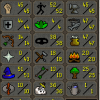
(0 reviews)

Due to problems in my life and having the boring parts of slayer to do (questing a skilling to make more efficient) i am finally back! :D


I am currently using chaeldar, i have barrows gloves (with 59 defence :D) and things are going well.


Currently cannoning harbie bug swarms
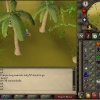
 

E9oFBPFH.jpg


if you can follow that picture to see whats going on, i am currently 68 slayer to 66 hp, a good 104k ahead :D


You can also see all my stats have evened our to get it all round better.


I got construction up for the use of ammy, alter and kharyll teleport as well :D


Looking forward to more updates as usuall!


Also now saving for a full slaying set, dfs, bandos, all that jazz :D

1 Comment

Recommended Comments

You seem to be having fun, keep it up! I myself am actually going for untrimmed as well! A pure though. :) 


1 defence, 89 slayer :) Takes a lot seeing as I can only use Vannakka ;-; but I'll get there..!

Important Information

By using this site, you agree to our Terms of Use.

Account

Navigation

Search

Search

Configure browser push notifications

Chrome (Android)
  1. Tap the lock icon next to the address bar.
  2. Tap Permissions → Notifications.
  3. Adjust your preference.
Chrome (Desktop)
  1. Click the padlock icon in the address bar.
  2. Select Site settings.
  3. Find Notifications and adjust your preference.
