




Skip to content
View in the app

A better way to browse. Learn more.

Tip.It Forum

A full-screen app on your home screen with push notifications, badges and more.

To install this app on iOS and iPadOS
  1. Tap the Share icon in Safari
  2. Scroll the menu and tap Add to Home Screen.
  3. Tap Add in the top-right corner.
To install this app on Android
  1. Tap the 3-dot menu (⋮) in the top-right corner of the browser.
  2. Tap Add to Home screen or Install app.
  3. Confirm by tapping Install.

Lured by minecraft?

(0 reviews)

So how is everybody's invention doing? Or are you - like me - waiting for the hype to die down a bit before plunging in to this new skill?


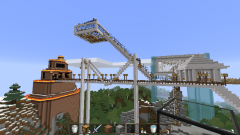
Meanwhile, aside from some reallifing, I feel myself being lured into minecraft a bit again. I'm working in creative on a marble&glass castle in the air!
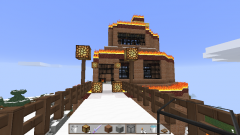
Tower of Fire

View of the Air Castle

More pics are at my picasa:

https://picasaweb.google.com/111057455050922171206/ScreenshotsMinecraft


and I have a page at my own website where I can dump the downloadlinks for the maps I'm working on and in, so if you want to take a peek yourself, go right ahead! :

http://www.rubenseschone.nl/minecraft.html


Obviously, when I finish that castle the next challenge is to build something like it in survival mode. It'll be a while before I am done with that castle though, as I keep getting ideas while working on it.

0 Comments

Recommended Comments

There are no comments to display.

Important Information

By using this site, you agree to our Terms of Use.

Account

Navigation

Search

Search

Configure browser push notifications

Chrome (Android)
  1. Tap the lock icon next to the address bar.
  2. Tap Permissions → Notifications.
  3. Adjust your preference.
Chrome (Desktop)
  1. Click the padlock icon in the address bar.
  2. Select Site settings.
  3. Find Notifications and adjust your preference.