




Skip to content
View in the app

A better way to browse. Learn more.

Tip.It Forum

A full-screen app on your home screen with push notifications, badges and more.

To install this app on iOS and iPadOS
  1. Tap the Share icon in Safari
  2. Scroll the menu and tap Add to Home Screen.
  3. Tap Add in the top-right corner.
To install this app on Android
  1. Tap the 3-dot menu (⋮) in the top-right corner of the browser.
  2. Tap Add to Home screen or Install app.
  3. Confirm by tapping Install.

Mochila

(0 reviews)

One of the things I do when I'm reallifing, is crocheting. I like crocheting a lot (amongst other yarnbased crafts), and in between all the exercises and walking I have to do at the moment, I crocheted this tiny mochila bag.
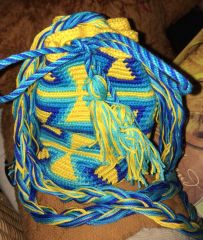
Tiny mochilabag


I liked the mochila technique and made a design of my own. Bought yarn too already. It will be a black oval bag on which pacman and the four ghosts are chasing each other for ever and ever and ever and ever...

I doubted between pacman and space invaders for a moment, but pacman seemed a bit simpler. Maybe in the future I will have become so good at this mochila thing that I can try my hand at an rs related design? Who knows! (okay, maybe I should make myself a tardis rucksack first?).


Love,

Ingrid.

0 Comments

Recommended Comments

There are no comments to display.

Important Information

By using this site, you agree to our Terms of Use.

Account

Navigation

Search

Search

Configure browser push notifications

Chrome (Android)
  1. Tap the lock icon next to the address bar.
  2. Tap Permissions → Notifications.
  3. Adjust your preference.
Chrome (Desktop)
  1. Click the padlock icon in the address bar.
  2. Select Site settings.
  3. Find Notifications and adjust your preference.
