




Skip to content
View in the app

A better way to browse. Learn more.

Tip.It Forum

A full-screen app on your home screen with push notifications, badges and more.

To install this app on iOS and iPadOS
  1. Tap the Share icon in Safari
  2. Scroll the menu and tap Add to Home Screen.
  3. Tap Add in the top-right corner.
To install this app on Android
  1. Tap the 3-dot menu (⋮) in the top-right corner of the browser.
  2. Tap Add to Home screen or Install app.
  3. Confirm by tapping Install.

Fathers' Day

(0 reviews)

What should the official Arena Exodus initials be? 219 members have voted

  1. 1. What should the official Arena Exodus initials be?

    • X
      35%
      77
    • AE
      56%
      123
    • Other (please specify)
      8%
      19

Please sign in or register to vote in this poll.

I'm working on a portrait of my dad as a gift to him on Fathers' Day. Here's are screenshots of my progress at 25% zoom:


daddy.jpg


daddy2.jpg


I don't have as much experience drawing males as I do females so this is good experience for me :P Obviously I'm not done so.. stay tuned :)


EDIT:
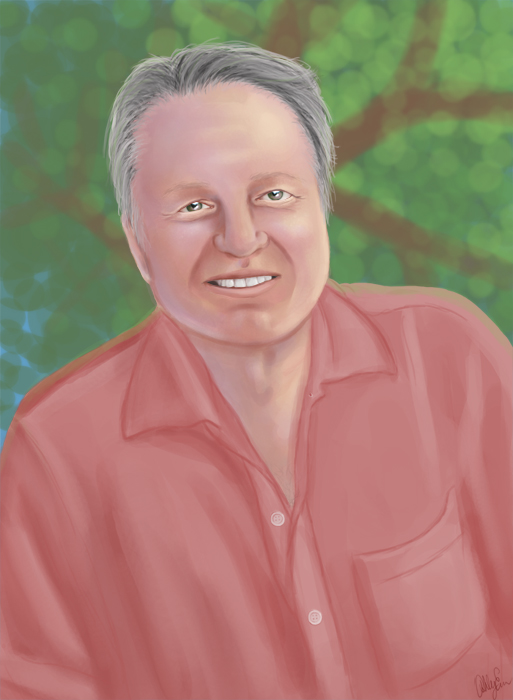
 

Fathers___Day_by_cazzyae.jpg

10 Comments

Recommended Comments

Tim

Members

Will it be printed and framed?

Maxingmck

Members

Bill clinton@@@

Tim

Members

That case I think he'd love it. :)

Guthorm

Members

It went from "man thats a bit creepy" to "is that a floating head"?


I mean is not bad but the unfinished world surprised me for a bit. :|

Perakp

Members

Looks great

That's really incredible Trips! It looks great! He'll love it :thumbup:

Gradeskip

Members

Incredible! :D

Abc1230

Members

I think you should give him the first one.

Echocut

Members

I love to see progression from sketches to finished product, makes it that you did a lot of work instead of just posting the final.


I think the watercolor hue looks great, but have you tried and make it more contrast turning more lifelike? Love it nonetheless.

Important Information

By using this site, you agree to our Terms of Use.

Account

Navigation

Search

Search

Configure browser push notifications

Chrome (Android)
  1. Tap the lock icon next to the address bar.
  2. Tap Permissions → Notifications.
  3. Adjust your preference.
Chrome (Desktop)
  1. Click the padlock icon in the address bar.
  2. Select Site settings.
  3. Find Notifications and adjust your preference.