



Skip to content
View in the app

A better way to browse. Learn more.

Tip.It Forum

A full-screen app on your home screen with push notifications, badges and more.

To install this app on iOS and iPadOS
  1. Tap the Share icon in Safari
  2. Scroll the menu and tap Add to Home Screen.
  3. Tap Add in the top-right corner.
To install this app on Android
  1. Tap the 3-dot menu (⋮) in the top-right corner of the browser.
  2. Tap Add to Home screen or Install app.
  3. Confirm by tapping Install.

So much to do, so little time!
(0 reviews)

Boy did I have time to scape these last few weeks. Not! In total I was online for like one day or less in the last month. Too much real life getting in the way :)

Well, and a bit computery too, I am teaching myself how to photoshop at the moment, plus of course I have my work and my household-chores and everything. But I also like to walk and of course taking my camera with me, as I have taken up one of my old hobbies: photography. The picture I want to share with you, is one that made it from my camera to the interwebz without alterations whatsoever. I didn't even crop it, as the composition was okay with me to begin with.


This picture is a detail of the local cathedral bell tower. The tower has six sides and a clock on each side. So, no matter from what direction you look at the tower, you always see at least two clocks. The tower is nicknamed "Drunk Man's Tower" because of that, even though it's official name is Jozefchurch.
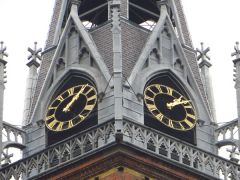


Drunk Man's tower

1 Comment

Recommended Comments

Flodder450

Members

St Jozefskathedraal, Neo-gotisch kerkje, erg mooi idd :)! loop er wel eens langs op weg naar station als in Stad geweest ben :)

Important Information

By using this site, you agree to our Terms of Use.

Account

Navigation

Search

Search

Configure browser push notifications

Chrome (Android)
  1. Tap the lock icon next to the address bar.
  2. Tap Permissions → Notifications.
  3. Adjust your preference.
Chrome (Desktop)
  1. Click the padlock icon in the address bar.
  2. Select Site settings.
  3. Find Notifications and adjust your preference.