



Skip to content
View in the app

A better way to browse. Learn more.

Tip.It Forum

A full-screen app on your home screen with push notifications, badges and more.

To install this app on iOS and iPadOS
  1. Tap the Share icon in Safari
  2. Scroll the menu and tap Add to Home Screen.
  3. Tap Add in the top-right corner.
To install this app on Android
  1. Tap the 3-dot menu (⋮) in the top-right corner of the browser.
  2. Tap Add to Home screen or Install app.
  3. Confirm by tapping Install.

Colouring old photographs

(0 reviews)

One of the things I've been up to besides an occasional evening scaping, is the retouching of old familyphotographs. By now, I am kind of getting the hang of it. Example: this photograph of my mother when she was 2. Left the original, in the middle the black and white retouched one and on the right I added colour to the picture. Lot of work, but great to do!
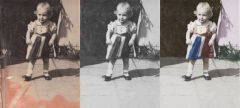
 

a retouched old photograph of my then two year old mother

1 Comment

Recommended Comments

Solemn

Members

thats pretty cool!

Important Information

By using this site, you agree to our Terms of Use.

Account

Navigation

Search

Search

Configure browser push notifications

Chrome (Android)
  1. Tap the lock icon next to the address bar.
  2. Tap Permissions → Notifications.
  3. Adjust your preference.
Chrome (Desktop)
  1. Click the padlock icon in the address bar.
  2. Select Site settings.
  3. Find Notifications and adjust your preference.