



Skip to content
View in the app

A better way to browse. Learn more.

Tip.It Forum

A full-screen app on your home screen with push notifications, badges and more.

To install this app on iOS and iPadOS
  1. Tap the Share icon in Safari
  2. Scroll the menu and tap Add to Home Screen.
  3. Tap Add in the top-right corner.
To install this app on Android
  1. Tap the 3-dot menu (⋮) in the top-right corner of the browser.
  2. Tap Add to Home screen or Install app.
  3. Confirm by tapping Install.

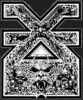
anybody notice this in theyre siggy?/summoning logo?
Featured Replies

i think i mightve found the summoning logo!! look at my siggy, it has the wolf head thing! idk if this is it or what but yea... \'


btw mods if you need to lock this because it has to do with the summoning logo, go ahead :-w

Unfinished netherrack symbol of Khorne.


Never forget. ~creeper face w/single tear~


DO YOU HEAR THE VOICES TOO?!?!

omg no i'm not ranked in it :wall:


edit: draynor.net > runeweb.net


Mine don't show it!

oie_080707215636np9.png
  • Author
omg no i'm not ranked in it :wall:


:P mwuahahahahhahahaa :twisted:

Unfinished netherrack symbol of Khorne.


Never forget. ~creeper face w/single tear~


DO YOU HEAR THE VOICES TOO?!?!

Looks really nice. Hope it gets that nice in Skill Menu too.

Owner of Quest Cape since 11/9/2007 23:30! Working my butt off to get it back.


lemurian04.png

It could very well be the real logo, and probably is, since that script seems to auto-fetch images for skills from the hiscore server (like defense.jpeg, prayer.jpeg, etc... Same would be for summoning.jpeg)


Still, post screens like this here next time: http://forum.tip.it/viewtopic.php?t=710789


(And any other game-related screenshots, be it logos or anything else)

Guest
This topic is now closed to further replies.

Important Information

By using this site, you agree to our Terms of Use.

Account

Navigation

Search

Search

Configure browser push notifications

Chrome (Android)
  1. Tap the lock icon next to the address bar.
  2. Tap Permissions → Notifications.
  3. Adjust your preference.
Chrome (Desktop)
  1. Click the padlock icon in the address bar.
  2. Select Site settings.
  3. Find Notifications and adjust your preference.