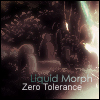
October 29, 200620 yr Hi there, been working on this earlier today, but...however, I must state that this is a W.I.P. piece! It's no were near complete, and I'm still working on the lighting, flow, contrast and brightness. I'm just wondering, if there's anything I should change/remove/add before I go into any further with it? V1 V2 V3 V4 V5 - Final To view the original render, click HERE!
October 29, 200620 yr I like the colours, and the blending in of the render :) It could use a small border, or maybe a tech border :D I prefer the one with the vector Quit Runescape 30th May 2006.Thanks to Hawkxs for my signature :)
October 29, 200620 yr Author I like the colours, and the blending in of the render :) It could use a small border, or maybe a tech border :D I prefer the one with the vector Heh, I thought the vectors kinda over-did it, I've already gone over the .psd with vectors anyway and Photoshop doesn't undo that far back. :XD: -edit- Retract that statement, I do infact have the .psd of it, I forgot I only just undid the vector layer and saved it, hehe, so yeah. Still got the vectors. ;)
October 29, 200620 yr Author This requires a new post, in my opinion, this sig is finished. :thumbsup:
October 29, 200620 yr Pretty hectic, and the size is huge. =P But good lighting and blending. v4 is best imo ;P Good depth/light source. But like I said too hectic. Protect the Light...
October 29, 200620 yr Pretty hectic, and the size is huge. =P But good lighting and blending. v4 is best imo ;P Good depth/light source. But like I said too hectic. Agreed. Cept i like version 3, the lighter one, better. Everybody lovin' it, but ain't no body touchin' it
October 30, 200620 yr Really like V5, nice light and colours! Joe. :D [Admin Edit: Referral links are not permitted in signatures or posts]
October 31, 200620 yr I prefer the lighter ones but meh, good work. eddieperfect - (Unjustly) Banned 06.06eddieperfekt - Created 05.11.06 Prankster_King - "ItÃÆââââ¬Å¡Ã¬Ã¢ââ¬Å¾Ã¢s just click after click after click."
October 31, 200620 yr Oohh, I like this one.... can'y say which is the best. Nice work, 9.5/10. Writing in colour was fun while it lasted...The Tip.It. Furry! :D




Create an account or sign in to comment