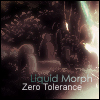
October 30, 200619 yr It looks pretty good. Mod class. But like I said, it seems something is missing.. I just don't know what. It seems a little too blurry though... Protect the Light...
October 30, 200619 yr Author Thanks for the input Metroid. Updated first post, made my first black and white sig. :XD:
October 31, 200619 yr Looks a bit "plastic", don't know if you were gouing for that, i like the bg and the border. eddieperfect - (Unjustly) Banned 06.06eddieperfekt - Created 05.11.06 Prankster_King - "ItÃÆââââ¬Å¡Ã¬Ã¢ââ¬Å¾Ã¢s just click after click after click."
October 31, 200619 yr Author Looks a bit "plastic", don't know if you were gouing for that, i like the bg and the border. For the background I just did a lot of brushing and layers of lighting. The border was 1 minute job. :XD:
October 31, 200619 yr IMO the oval spots at the right are too light. They should be darker, as now they stand out bit too much. [Star Wreck][PM me][My gallery][DeviantArt][Cool T-shirts!][iron Sky - Trailer is now out!]




Create an account or sign in to comment