



Skip to content
View in the app

A better way to browse. Learn more.

Tip.It Forum

A full-screen app on your home screen with push notifications, badges and more.

To install this app on iOS and iPadOS
  1. Tap the Share icon in Safari
  2. Scroll the menu and tap Add to Home Screen.
  3. Tap Add in the top-right corner.
To install this app on Android
  1. Tap the 3-dot menu (⋮) in the top-right corner of the browser.
  2. Tap Add to Home screen or Install app.
  3. Confirm by tapping Install.

200M RC XP Calculations!

(0 reviews)

Alright. So I'm a complete dork for this, but oh well, I'm glad to know now.


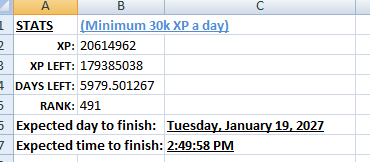
So I recently made a quite large spreadsheet of formulas to determine how long it will exactly take me to get 200M RC XP.


I've got the spreadsheet to update everytime I open it, or one minute, so the calculations are updated nicely. I programmed it in to grab my Runecrafting highscores, along with my rank and such, also with my current XP. I subtracted my current XP from 200M XP.


I then wanted to figure out the longest time it would take me. Because I do effigys everyday, and I know I can squeeze in five minutes a day, this is as accurate as I can make it to my life. I know though, that I will probably gain more than 30k XP a day, so in that sense, all I really did was calculated the max time it will take me to get 200M RC XP.


So, my findings are this. If I only gain 30k XP a day, I will have gained 200M RC XP on Tuesday, January 19, 2027, at 2:49 PM with 58 seconds. Now this is updating constantly, so the number will have changed by the time I'm done writing this. That is the latest time I will get it.


:ugeek:
 

stats.png

5 Comments

Recommended Comments

Singh

Members

very nice :)

Ilufyou

Members

loll'ed :D

good luck tough.


P.S. try to get it quicker then 2027 are u'll be broke after paying that much money for being member..

UnknownRemoval

Members

loll'ed :D

good luck tough.


P.S. try to get it quicker then 2027 are u'll be broke after paying that much money for being member..


Win some lifetime membership.

Vulxai

Members

Oh, too bad the world's ending in 2012, eh?

FirenLazah

Members

Holy [cabbage] that long?

Important Information

By using this site, you agree to our Terms of Use.

Account

Navigation

Search

Search

Configure browser push notifications

Chrome (Android)
  1. Tap the lock icon next to the address bar.
  2. Tap Permissions → Notifications.
  3. Adjust your preference.
Chrome (Desktop)
  1. Click the padlock icon in the address bar.
  2. Select Site settings.
  3. Find Notifications and adjust your preference.