Skip to content
View in the app

A better way to browse. Learn more.

Tip.It Forum

A full-screen app on your home screen with push notifications, badges and more.

To install this app on iOS and iPadOS
  1. Tap the Share icon in Safari
  2. Scroll the menu and tap Add to Home Screen.
  3. Tap Add in the top-right corner.
To install this app on Android
  1. Tap the 3-dot menu (⋮) in the top-right corner of the browser.
  2. Tap Add to Home screen or Install app.
  3. Confirm by tapping Install.

99 #4: Firemaking

(0 reviews)

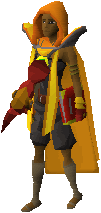
99fm_003.gifOHAI.


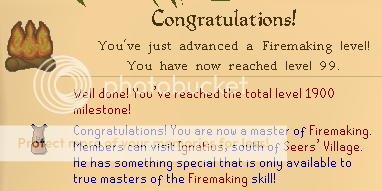
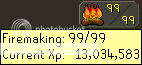
99 Firemaking

October 17, 2010


99fm_001.png99fm_002.png


Also got 1900 Total Level with this level!


I didn't really tell anyone before I got this, didn't really feel like a party. But thank you to everyone who congratulated me in HYT Clan chat! <3:


- Serpy

8 Comments

Recommended Comments

Noob didn't invite me.

Congrats on 99 burning stuff <33

dirk4slayer

Members

:thumbup:

Neos_Matrix

Members

Gratz! You deserve it.


Although, I should get one soon.. <_<

Dax

Members

Congrats. ;o

Tim

Members

Stop getting so many 99's. I hate having only defence. ;____;


<33

Saradomin_Mage

Members

Why/how the heck do you have more 99's than me?!

Siobhana

Members

Grats Serpy. Good job on 99 pyromaniacy :thumbsup:

Juhnie

Members

lol nerd.

:thumbsup: :wub:

Important Information

By using this site, you agree to our Terms of Use.

Account

Navigation

Search

Search

Configure browser push notifications

Chrome (Android)
  1. Tap the lock icon next to the address bar.
  2. Tap Permissions → Notifications.
  3. Adjust your preference.
Chrome (Desktop)
  1. Click the padlock icon in the address bar.
  2. Select Site settings.
  3. Find Notifications and adjust your preference.