October 7, 201115 yr After downloading a pdf file is there a way I can remove the whiteout boxes?I have tried using http://www.pdfescape.com/ but it wont let me remove the whiteouts :( I am not going to buy Adobe pro reader whatever it is way too expensive, but I would buy THIS if I knew it was going to work. I would greatly appretiate any help
October 8, 201115 yr I haven't worked that much with pdf files but can you take a picture to show me what those "whiteout boxes" are?
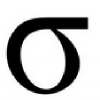
October 8, 201115 yr Author There is text hidden behind the white boxes. The blue part is where I have highlighted, I can copy and paste that but because most of it is mathematical symbols whatever I paste it into doesn't recognise the characters.
October 27, 201114 yr Author Yeah unfortunately I don't have access to the source file :( As I said Adobe software is way beyond my budjet. I tried using open office draw like someone in that link suggested but the pdf doc just came up as code again. Thankyou for the ideas anyway, I will keep looking through the link you gave for more ideas.
October 27, 201114 yr Try converting it to a .doc file, it works for broken .pdf files that Adobe wont open, not sure about white outs.http://convertpdftoword.net/ Why can't the Big Bang be done by the hand of God?It could have, but it is next to impossible because it also could have been caused by the flying spaghetti monster, or one of the other infinite number of deity possibilities.
October 28, 201114 yr Author Try converting it to a .doc file, it works for broken .pdf files that Adobe wont open, not sure about white outs.http://convertpdftoword.net/I truly love people who are smarter than me. Converting it into word removed the white boxes. Word starter can handle subsrcripts/ superscripts/ most greek letters/ dots above letters/ most square root signs! Pretty much the only thing it cant handle are fractions and some greek letters which can be gotten by changing the font.Gonna try saving it in other programs :DYou made my day
October 28, 201114 yr Try converting it to a .doc file, it works for broken .pdf files that Adobe wont open, not sure about white outs.http://convertpdftoword.net/I truly love people who are smarter than me. Converting it into word removed the white boxes. Word starter can handle subsrcripts/ superscripts/ most greek letters/ dots above letters/ most square root signs! Pretty much the only thing it cant handle are fractions and some greek letters which can be gotten by changing the font.Gonna try saving it in other programs :DYou made my day Glad I could help :) Why can't the Big Bang be done by the hand of God?It could have, but it is next to impossible because it also could have been caused by the flying spaghetti monster, or one of the other infinite number of deity possibilities.




Create an account or sign in to comment