




By Daavorian
· 1320 views
So...This is me my first blog post...I'm also pretty new to tip.it forums (though I've used tip.it for quite some time)...anyways.
I'm here to talk about stuff...more specifically the stuff I do. I think that's interesting stuff, don't you? I'm a crazed quester, a follower of Zaros, defeater of dagannoths, user of Magicks and Curses, Legend, Champion, Hero, Savior of the Cave Goblins, Killer of Tyras, Member of the Myreque, Servant of the gods, and rebel against them...
I'm also proud to say I have 60 in every skill...and I'm hoping this blog will document me getting 70 in all.
1000 Green Dragons
I recently got into the Christmas spirit...i decided i would give 1000 dragon bones to the gods, give 333 people a dragonhide body (and one person a pair of vambraces) (all for G. E. prices of course...), and give 1000 dragons a taste of my whip...I decided these dragons had to be of a christmas-ey color: that meant green, red, or white. Red was to hard, white doesn't exist (and i didn't exactly fancy gathering 333 third age dragonhide bodies) so it had to be green...and so I did that...and below are the results. (I hid them so they don't resize <_< )
[hide]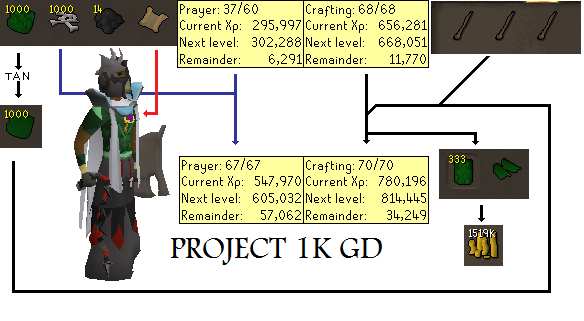 [/hide]
[hide] [/hide]
[hide] [/hide]
In Other News...
I got 67 mining today.
I got Guthix plate and d'hide bodies while killing the drags.
I played around with an ags for 7 hours today.
Recommended Comments