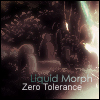
August 3, 200620 yr Hey, just made this sig for a friend, hoping for some comments, criticism, etc. ;) Cheers, Josh
August 3, 200620 yr It's awesome. The text on the bottom is kind of hard to read but that's about it. Great job!!
August 3, 200620 yr nice work, well blended and a nice choice of colours. i would move the render a little bit to our left though, as his hand looks weird not grabbing onto anything. Fix the bottom text too, RM "A disbelief in magic can force some poor souls into believing in authority and business"
August 3, 200620 yr Nice. Good render blending, cloudy grunge on top, nice lighting... Text doesn't fit, either of them, try some different fonts?
August 3, 200620 yr wicked choice of game and wicked signature to match it. Only problem must be the text and Bottom left (our left) might look better darker. PS3 ftw
August 4, 200620 yr Very nice sig man, I like it :) Check out my Slayer Blog!Mod Elder - 117 Combat.Moogs, Rs Legend - You'll be missed.
August 4, 200620 yr I like it, your sigs are usually very good! Thanks To: Everyone for the siggies, especially Kal for the Pixel.Currently Playing: FIFA 07, NFS: Carbon, Morrowind and Dungeon Siege II.




Create an account or sign in to comment