



Skip to content
View in the app

A better way to browse. Learn more.

Tip.It Forum

A full-screen app on your home screen with push notifications, badges and more.

To install this app on iOS and iPadOS
  1. Tap the Share icon in Safari
  2. Scroll the menu and tap Add to Home Screen.
  3. Tap Add in the top-right corner.
To install this app on Android
  1. Tap the 3-dot menu (⋮) in the top-right corner of the browser.
  2. Tap Add to Home screen or Install app.
  3. Confirm by tapping Install.

#11: Completionist: Week 3.

(0 reviews)

Did a bit of Fletching this week, and gained 94 Fletching:
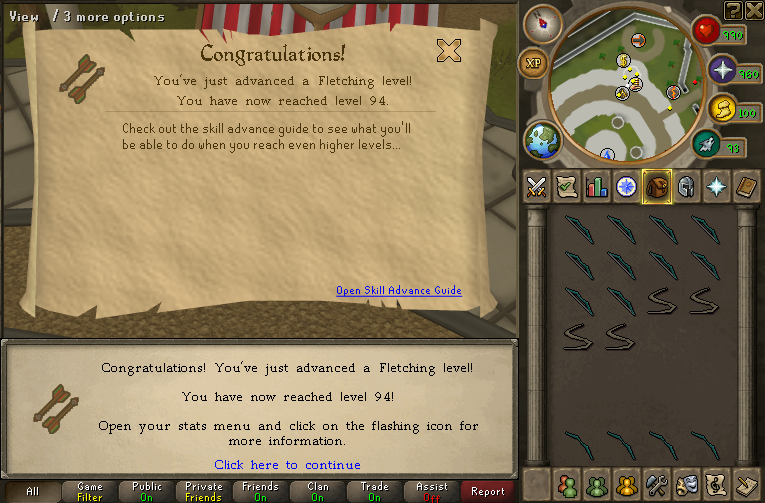
94.png


Then I finished up the Golden Mining suit:
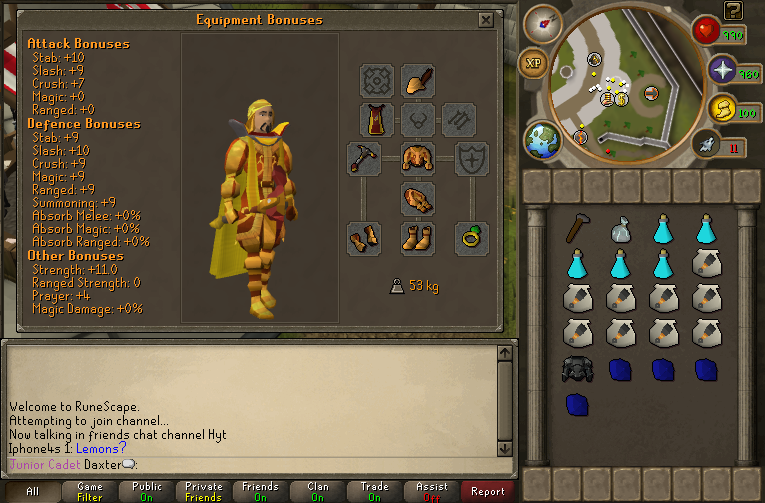
GoldenMiningSuit.png


This whole Completionist is going slow, considering I got a job, and fifty thousand other games to play. Might make a serious push to finish Fletching or Thieving off, I don't know. Catch you next time, ~Dax.

2 Comments

Recommended Comments

12pure34

Members

Don't overdo it :) I love slow and steady progress. It's only a hobby of course :D Good luck!


P.S. what other games you play?

Dax

Members

@Pure: Currently replaying through GTA IV and its episodes, started Saints Row The Third a couple of days ago, have a mostly finished Pokemon White save and got an Oblivion game going as well. Ah, the joys of having few commitments.

Important Information

By using this site, you agree to our Terms of Use.

Account

Navigation

Search

Search

Configure browser push notifications

Chrome (Android)
  1. Tap the lock icon next to the address bar.
  2. Tap Permissions → Notifications.
  3. Adjust your preference.
Chrome (Desktop)
  1. Click the padlock icon in the address bar.
  2. Select Site settings.
  3. Find Notifications and adjust your preference.