



Skip to content
View in the app

A better way to browse. Learn more.

Tip.It Forum

A full-screen app on your home screen with push notifications, badges and more.

To install this app on iOS and iPadOS
  1. Tap the Share icon in Safari
  2. Scroll the menu and tap Add to Home Screen.
  3. Tap Add in the top-right corner.
To install this app on Android
  1. Tap the 3-dot menu (⋮) in the top-right corner of the browser.
  2. Tap Add to Home screen or Install app.
  3. Confirm by tapping Install.

85: Dr. Dax, Or How I Learned to Stop Worrying and Love the Tetsu.

(0 reviews)

Yeah, I don't even like the movie that much, I just really like the title.


Little bit of cool stuff this week, like me finally getting Tetsu Legs! Woo!
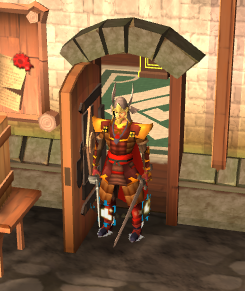
 

TetsuLegs_zps6f01d720.png


Wait. What's that? I got the helm as well!? Yes I did, Other Dax, yes I did.


FullTetsu_zps32b23c95.png


Full Tetsu is sexy. But Dax, we ask, how did you get that Plate you needed? Simple, this!


Hyu-JiComplete_zpsee6a583a.png


And finally, on the Ports note, I got another scroll piece:


SeasingerLegsScroll02_zps47cd80b4.png


Awesome stuff. I also acquired a few levels, Hunting all those Charm Sprites last week landed me nice and close to a level there, so with lamps and a little more training, I pushed myself to another level, 94!


94Hunter_zps61c4fb9a.png


Lastly, but not least importantly, 102 Dungeoneering. 118.5k free exp a day is awesome. I love it.


102Dungeoneering_zps426dc792.png


Catch you next time, ~Dax.

3 Comments

Recommended Comments

Pepsiguy

Members

YAYYYYY

primadog

Members

I always enjoy your picture diaries. Keep them coming!

PolarBearBlue

Members

I have so much jelly right ow. So much...

Important Information

By using this site, you agree to our Terms of Use.

Account

Navigation

Search

Search

Configure browser push notifications

Chrome (Android)
  1. Tap the lock icon next to the address bar.
  2. Tap Permissions → Notifications.
  3. Adjust your preference.
Chrome (Desktop)
  1. Click the padlock icon in the address bar.
  2. Select Site settings.
  3. Find Notifications and adjust your preference.